
1.How to add an APP?
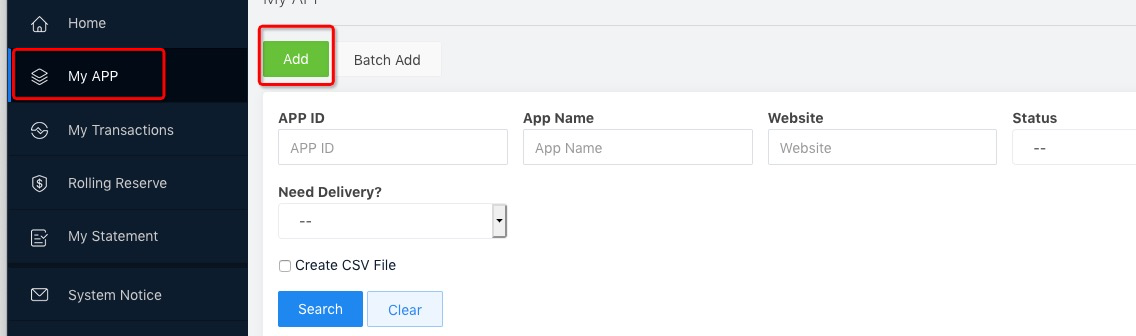
After MID activated , you can click “Add” in the module of “My APP”. A pop-up appears:
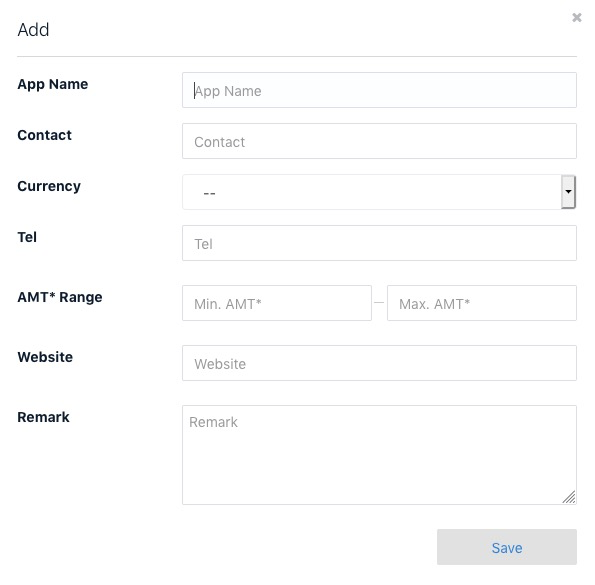
App Name: Related to the website
Contact: Contact person’s name
Currency: Transaction currency (if multiple currencies, please choose one)
Tel: Contact person’s tel
AMT* Range: The real amount range
Website: A valid website in the form of “http/https://www.xxx.com”
Remark: If any
If merchant has more than one website they can use the function of “Batch Add” according to app_template requirement.
After APP added, please contact Airsecurecard compliance staff to activate.
2.How to delete an APP?
In“My APP”, you can choose to perform only on condition that there is no any transaction.
